









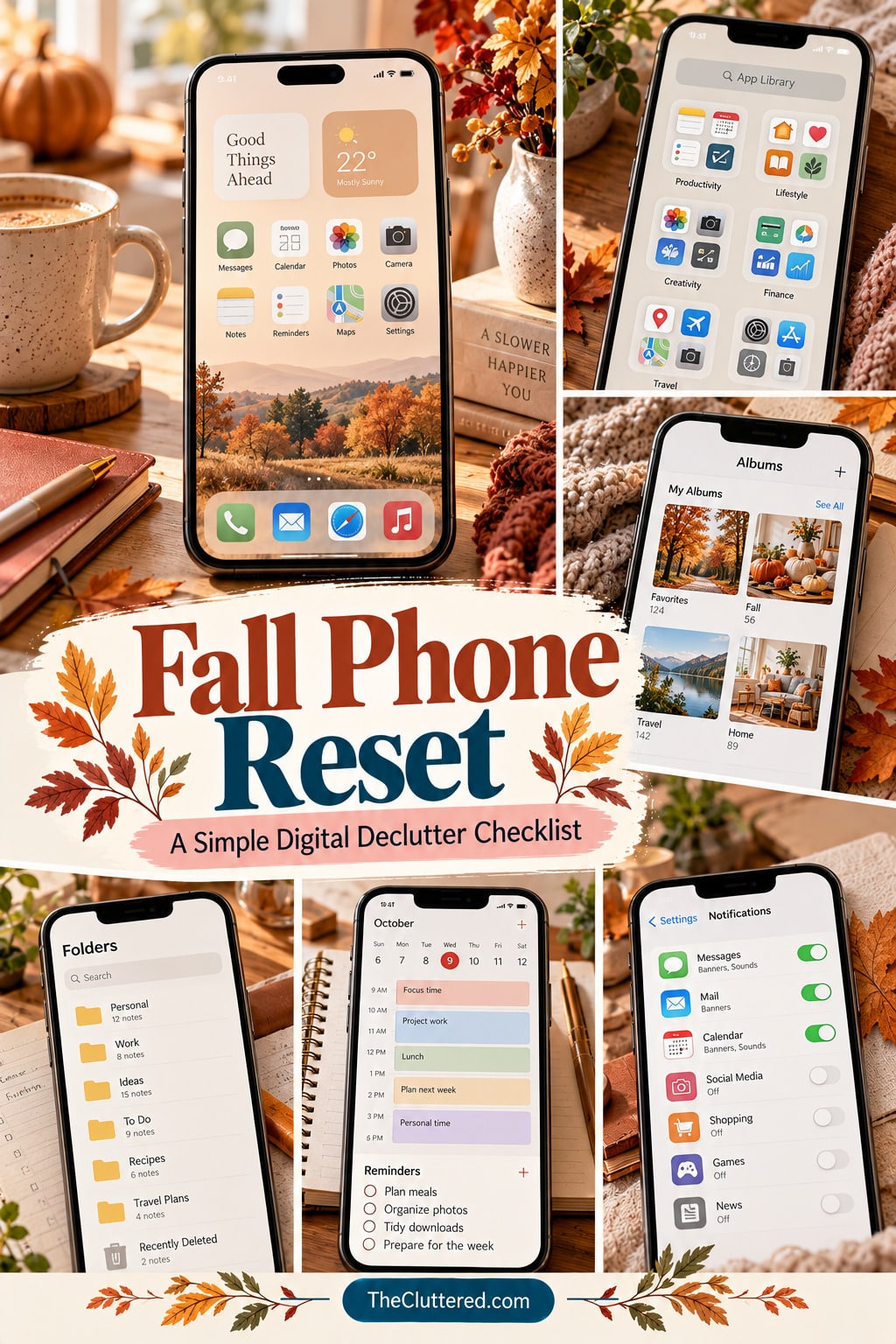


A fall reset is a good excuse to make your phone feel less crowded before routines get busier. A fall reset phone organization checklist helps you clear digital clutter, find the tools you use most, and make your home screen support the season you’re moving into—without turning a simple refresh into an all-day project.
You don’t need a perfect minimalist screen or a brand-new set of apps. Start with the small things that create friction: unused apps, overflowing screenshots, old downloads, noisy notifications, and reminders that no longer match your life. Work in short passes, and stop when your phone feels easier to use.
Quick Start: Your 20-Minute Phone Reset
- Minutes 1–4: Delete or offload apps you recognize and no longer use.
- Minutes 5–8: Sort recent screenshots and duplicate photos; save anything important first.
- Minutes 9–12: Clear old downloads and tidy notes you can confidently archive or delete.
- Minutes 13–16: Review notifications, email subscriptions, and app badges.
- Minutes 17–20: Put your most-used apps, calendar, and reminders where they’re easy to reach.
Keep it low-pressure: If a category needs more time, leave it for another session. A partial reset that makes daily tasks easier is still useful.
1. Declutter Apps Before You Redesign Your Screen
Start with function rather than aesthetics. Scroll through your apps and ask whether each one is useful now, used occasionally, or no longer needed. Remove apps you’re comfortable deleting, and consider offloading apps if your device offers that option and you may want their data later.
- Delete apps you no longer recognize or use, after checking whether they store important data.
- Move occasional-use apps into one clearly named folder.
- Keep everyday tools—maps, camera, messages, calendar, notes—easy to reach.
- Review shopping, delivery, and social apps that compete for your attention.
Don’t delete an app just because it isn’t pretty on your home screen. The goal is a useful device, not a perfectly empty one.
2. Create a Calm Fall Home Screen
Once you’ve removed the obvious clutter, arrange the remaining apps around how you actually use your phone. A simple first screen might hold communication, calendar, camera, notes, and a weather app. Put less frequent tools on a second screen or in folders, depending on your device.
Choose a layout that fits your routine
- Practical: Keep your daily essentials on the first screen and group everything else by purpose.
- Minimal: Use fewer visible icons and rely on search or the app library for occasional tools.
- Seasonal: Choose an autumn wallpaper with enough open space for app names and widgets to remain readable.
Try one layout for a few days before changing it again. Repeatedly redesigning the screen can become another form of digital busywork.
3. Clean Up Photos and Screenshots
Photos and screenshots often become the largest visual backlog on a phone because they’re quick to capture and easy to forget. Start with recent screenshots, screen recordings, duplicate images, and blurry photos. Review before deleting, especially if you use shared albums or automatic cloud syncing.
- Delete screenshots that were saved only for a short-term task.
- Move useful receipts, reference images, or project inspiration into albums.
- Favorite meaningful photos so they’re easier to find later.
- Check “Recently Deleted” only after you’re certain nothing important was removed by mistake.
Aim for easier retrieval, not a perfectly empty camera roll. A few useful albums—such as Receipts, Home Ideas, Recipes, or Fall Inspiration—can be enough.
4. Refresh Notes, Files, and Downloads
Old lists, temporary notes, PDFs, and downloads can make it hard to find what you need. Search for obvious duplicates and outdated items, then sort the rest into a small number of categories. If a note contains account details, private information, or something you may need for work, take care before sharing or deleting it.
- Rename important notes so their purpose is clear.
- Combine duplicate grocery, packing, or running-to-do lists when practical.
- Delete expired downloads and files you can safely retrieve again.
- Move important documents to a folder you can locate consistently.
Use names you’ll naturally search for. “Fall trip packing list” is more useful than “New note 14.”
5. Reset Notifications, Email, and Reminders
Digital clutter isn’t only visual. Repeated alerts and stale reminders can make a phone feel noisy even when the home screen is tidy. Review which apps truly need to interrupt you and which can wait until you open them.
- Turn off nonessential notifications or change them to quieter delivery options.
- Unsubscribe from promotional emails you consistently ignore.
- Archive or label messages you may need instead of deleting them impulsively.
- Remove completed reminders and rewrite vague tasks into clear next actions.
- Review calendar events, recurring appointments, and seasonal commitments.
Before removing a reminder or email, check whether it contains a date, receipt, confirmation, or other information you might need later.
6. Make Your Phone Support Your Fall Routine
Seasonal organization works best when it reflects what is changing in your actual schedule. If you’re returning to classes, preparing for holidays, spending more time at home, or planning weekend outings, let the phone’s layout support those needs without adding more digital obligations.
- Add a calendar or weather widget only if it helps you make everyday decisions.
- Keep a short weekly task list rather than several competing reminder systems.
- Create a folder for current projects or seasonal plans, then archive it when the season changes.
- Choose a wallpaper that feels pleasant but leaves important text easy to read.
Don’t install a new productivity app just to complete a reset. The tools already on your phone may be enough.
Fall Reset Phone Organization Checklist
Use this list as a flexible reference. Check off only what applies to your phone.
- Review unused apps and remove only what you no longer need.
- Group occasional-use apps into simple folders.
- Put everyday essentials within easy reach.
- Choose a readable fall wallpaper.
- Review widgets and remove ones you never use.
- Delete temporary screenshots after reviewing them.
- Sort meaningful photos into a few useful albums.
- Review duplicate and blurry photos.
- Rename important notes.
- Archive or delete outdated notes carefully.
- Clear downloads you can safely remove.
- Organize important files into familiar folders.
- Review notification permissions.
- Unsubscribe from unwanted promotional emails.
- Clear completed reminders.
- Review recurring calendar events.
- Check storage settings if your phone is running low.
- Confirm important photos and files are backed up before major deletions.
Common Phone Reset Mistakes to Avoid
- Deleting too quickly: Check whether photos, files, or app data are backed up before removing them.
- Over-organizing: Too many folders can make apps harder to find. Keep the system simple.
- Adding more tools: A new app may create another inbox to maintain. Start with what you already have.
- Chasing an aesthetic: A beautiful screen is only useful if it remains readable and functional.
- Trying to finish everything: Split the reset into short sessions when needed.
Frequently Asked Questions
How often should I organize my phone?
A quick monthly check can help prevent small piles of digital clutter from growing. You can also do a seasonal reset when your schedule changes.
What should I delete first?
Start with easy, low-risk items such as apps you clearly no longer use, temporary screenshots, and downloads you can safely retrieve again. Review important data before deleting.
How can I organize my phone without downloading apps?
Use built-in folders, albums, notes, reminders, calendar tools, notification settings, and storage management. A new app is optional, not a requirement.
How do I make a fall home screen look organized?
Keep the first screen focused on everyday essentials, limit widgets to useful information, and choose a wallpaper with enough contrast for readable icons and text.
Will deleting photos always free up storage immediately?
Not necessarily. Some devices keep deleted items in a recently deleted folder, and cloud-sync settings can affect what happens across devices. Check your device’s storage and backup settings before removing large amounts of data.
Think of this reset as a small seasonal tune-up, not a digital makeover you have to get perfect. A phone that helps you find what you need, notice fewer unnecessary alerts, and support your current routines is organized enough to move into fall with a little more ease.
Phone Organization Inspiration: 25 Visual Ideas
Use these source images as inspiration rather than rules. Save the approaches that fit your phone, and adapt them to your own digital habits.
How to Organize Your Phone in 15 Minutes 📱 | Simple Digital Declutter

This pin offers a visual reference for phone reset and decluttering. The source title is “How to Organize Your Phone in 15 Minutes 📱 | Simple Digital Declutter,” giving readers a concrete starting point for a seasonal phone reset.
Use the example to notice one specific thing worth simplifying—an app cluster, a reminder list, a busy screen, or a backlog of digital items—rather than trying to reorganize everything at once.
Adapt the idea to your own device and habits. Keep what helps you, remove only what you no longer need, and check settings before deleting anything that may contain important information.
Phone Reset Checklist | iPhone & Android Digital Cleanup Guide | Minimalist Phone Declutter | Printable PDF

This pin offers a visual reference for reminders and daily routines. The source title is “Phone Reset Checklist | iPhone & Android Digital Cleanup Guide | Minimalist Phone Declutter | Printable PDF,” giving readers a concrete starting point for a seasonal phone reset.
Use the example to notice one specific thing worth simplifying—an app cluster, a reminder list, a busy screen, or a backlog of digital items—rather than trying to reorganize everything at once.
Adapt the idea to your own device and habits. Keep what helps you, remove only what you no longer need, and check settings before deleting anything that may contain important information.
How to Organize Your Phone in 15 Minutes 📱 | Simple Digital Decluttering Guide

This pin offers a visual reference for phone reset and decluttering. The source title is “How to Organize Your Phone in 15 Minutes 📱 | Simple Digital Decluttering Guide,” giving readers a concrete starting point for a seasonal phone reset.
Use the example to notice one specific thing worth simplifying—an app cluster, a reminder list, a busy screen, or a backlog of digital items—rather than trying to reorganize everything at once.
Adapt the idea to your own device and habits. Keep what helps you, remove only what you no longer need, and check settings before deleting anything that may contain important information.
Phone Declutter Checklist 📱✨ | Digital Reset & Organization

This pin offers a visual reference for phone reset and decluttering. The source title is “Phone Declutter Checklist 📱✨ | Digital Reset & Organization,” giving readers a concrete starting point for a seasonal phone reset.
Use the example to notice one specific thing worth simplifying—an app cluster, a reminder list, a busy screen, or a backlog of digital items—rather than trying to reorganize everything at once.
Adapt the idea to your own device and habits. Keep what helps you, remove only what you no longer need, and check settings before deleting anything that may contain important information.
15 Ways To Reset & Refresh Your iPhone (Digital Declutter & Organization Routine)

This pin offers a visual reference for home screen and visual layout. The source title is “15 Ways To Reset & Refresh Your iPhone (Digital Declutter & Organization Routine),” giving readers a concrete starting point for a seasonal phone reset.
Use the example to notice one specific thing worth simplifying—an app cluster, a reminder list, a busy screen, or a backlog of digital items—rather than trying to reorganize everything at once.
Adapt the idea to your own device and habits. Keep what helps you, remove only what you no longer need, and check settings before deleting anything that may contain important information.
📱 Phone Declutter Checklist

This pin offers a visual reference for reminders and daily routines. The source title is “📱 Phone Declutter Checklist,” giving readers a concrete starting point for a seasonal phone reset.
Use the example to notice one specific thing worth simplifying—an app cluster, a reminder list, a busy screen, or a backlog of digital items—rather than trying to reorganize everything at once.
Adapt the idea to your own device and habits. Keep what helps you, remove only what you no longer need, and check settings before deleting anything that may contain important information.
Fall Home Reset Checklist for a Cozy, Clean & Organized Home

This pin offers a visual reference for phone reset and decluttering. The source title is “Fall Home Reset Checklist for a Cozy, Clean & Organized Home,” giving readers a concrete starting point for a seasonal phone reset.
Use the example to notice one specific thing worth simplifying—an app cluster, a reminder list, a busy screen, or a backlog of digital items—rather than trying to reorganize everything at once.
Adapt the idea to your own device and habits. Keep what helps you, remove only what you no longer need, and check settings before deleting anything that may contain important information.
September Reset Checklist 🌸🍂 | Cozy Autumn Planning & Self-Care

This pin offers a visual reference for reminders and daily routines. The source title is “September Reset Checklist 🌸🍂 | Cozy Autumn Planning & Self-Care,” giving readers a concrete starting point for a seasonal phone reset.
Use the example to notice one specific thing worth simplifying—an app cluster, a reminder list, a busy screen, or a backlog of digital items—rather than trying to reorganize everything at once.
Adapt the idea to your own device and habits. Keep what helps you, remove only what you no longer need, and check settings before deleting anything that may contain important information.
20-Minute Digital Reset Checklist | Phone Organization & Productivity Tips

This pin offers a visual reference for reminders and daily routines. The source title is “20-Minute Digital Reset Checklist | Phone Organization & Productivity Tips,” giving readers a concrete starting point for a seasonal phone reset.
Use the example to notice one specific thing worth simplifying—an app cluster, a reminder list, a busy screen, or a backlog of digital items—rather than trying to reorganize everything at once.
Adapt the idea to your own device and habits. Keep what helps you, remove only what you no longer need, and check settings before deleting anything that may contain important information.
Phone Declutter Checklist: Quick Steps for a Cleaner, Organized Digital Life

This pin offers a visual reference for phone reset and decluttering. The source title is “Phone Declutter Checklist: Quick Steps for a Cleaner, Organized Digital Life,” giving readers a concrete starting point for a seasonal phone reset.
Use the example to notice one specific thing worth simplifying—an app cluster, a reminder list, a busy screen, or a backlog of digital items—rather than trying to reorganize everything at once.
Adapt the idea to your own device and habits. Keep what helps you, remove only what you no longer need, and check settings before deleting anything that may contain important information.
Fall Phone Layout Ideas 🍂 Cozy Autumn Aesthetic for Your Home Screen

This pin offers a visual reference for home screen and visual layout. The source title is “Fall Phone Layout Ideas 🍂 Cozy Autumn Aesthetic for Your Home Screen,” giving readers a concrete starting point for a seasonal phone reset.
Use the example to notice one specific thing worth simplifying—an app cluster, a reminder list, a busy screen, or a backlog of digital items—rather than trying to reorganize everything at once.
Adapt the idea to your own device and habits. Keep what helps you, remove only what you no longer need, and check settings before deleting anything that may contain important information.
Free Printable Autumn Reset Checklist | Fall Reset, Self Care & Organization

This pin offers a visual reference for phone reset and decluttering. The source title is “Free Printable Autumn Reset Checklist | Fall Reset, Self Care & Organization,” giving readers a concrete starting point for a seasonal phone reset.
Use the example to notice one specific thing worth simplifying—an app cluster, a reminder list, a busy screen, or a backlog of digital items—rather than trying to reorganize everything at once.
Adapt the idea to your own device and habits. Keep what helps you, remove only what you no longer need, and check settings before deleting anything that may contain important information.
Phone Full & Messy? Clean It Up in 15 Minutes 📱

This pin offers a visual reference for phone reset and decluttering. The source title is “Phone Full & Messy? Clean It Up in 15 Minutes 📱,” giving readers a concrete starting point for a seasonal phone reset.
Use the example to notice one specific thing worth simplifying—an app cluster, a reminder list, a busy screen, or a backlog of digital items—rather than trying to reorganize everything at once.
Adapt the idea to your own device and habits. Keep what helps you, remove only what you no longer need, and check settings before deleting anything that may contain important information.
declutter your phone to minimize extra stress caused by unread texts and an unorganized phone✨😌

This pin offers a visual reference for phone reset and decluttering. The source title is “declutter your phone to minimize extra stress caused by unread texts and an unorganized phone✨😌,” giving readers a concrete starting point for a seasonal phone reset.
Use the example to notice one specific thing worth simplifying—an app cluster, a reminder list, a busy screen, or a backlog of digital items—rather than trying to reorganize everything at once.
Adapt the idea to your own device and habits. Keep what helps you, remove only what you no longer need, and check settings before deleting anything that may contain important information.
Phone Reset Checklist 📱

This pin offers a visual reference for reminders and daily routines. The source title is “Phone Reset Checklist 📱,” giving readers a concrete starting point for a seasonal phone reset.
Use the example to notice one specific thing worth simplifying—an app cluster, a reminder list, a busy screen, or a backlog of digital items—rather than trying to reorganize everything at once.
Adapt the idea to your own device and habits. Keep what helps you, remove only what you no longer need, and check settings before deleting anything that may contain important information.
10 Things to Delete From Your Phone for a Digital Reset

This pin offers a visual reference for phone reset and decluttering. The source title is “10 Things to Delete From Your Phone for a Digital Reset,” giving readers a concrete starting point for a seasonal phone reset.
Use the example to notice one specific thing worth simplifying—an app cluster, a reminder list, a busy screen, or a backlog of digital items—rather than trying to reorganize everything at once.
Adapt the idea to your own device and habits. Keep what helps you, remove only what you no longer need, and check settings before deleting anything that may contain important information.
Phone declutter

This pin offers a visual reference for phone reset and decluttering. The source title is “Phone declutter,” giving readers a concrete starting point for a seasonal phone reset.
Use the example to notice one specific thing worth simplifying—an app cluster, a reminder list, a busy screen, or a backlog of digital items—rather than trying to reorganize everything at once.
Adapt the idea to your own device and habits. Keep what helps you, remove only what you no longer need, and check settings before deleting anything that may contain important information.
Fall Home Screen 🍂🍁

This pin offers a visual reference for home screen and visual layout. The source title is “Fall Home Screen 🍂🍁,” giving readers a concrete starting point for a seasonal phone reset.
Use the example to notice one specific thing worth simplifying—an app cluster, a reminder list, a busy screen, or a backlog of digital items—rather than trying to reorganize everything at once.
Adapt the idea to your own device and habits. Keep what helps you, remove only what you no longer need, and check settings before deleting anything that may contain important information.
Phone Declutter Checklist: Essential Steps to Clean Up Your Smartphone

This pin offers a visual reference for phone reset and decluttering. The source title is “Phone Declutter Checklist: Essential Steps to Clean Up Your Smartphone,” giving readers a concrete starting point for a seasonal phone reset.
Use the example to notice one specific thing worth simplifying—an app cluster, a reminder list, a busy screen, or a backlog of digital items—rather than trying to reorganize everything at once.
Adapt the idea to your own device and habits. Keep what helps you, remove only what you no longer need, and check settings before deleting anything that may contain important information.
September Reset: 10 Things to Declutter & Organize

This pin offers a visual reference for reminders and daily routines. The source title is “September Reset: 10 Things to Declutter & Organize,” giving readers a concrete starting point for a seasonal phone reset.
Use the example to notice one specific thing worth simplifying—an app cluster, a reminder list, a busy screen, or a backlog of digital items—rather than trying to reorganize everything at once.
Adapt the idea to your own device and habits. Keep what helps you, remove only what you no longer need, and check settings before deleting anything that may contain important information.
Digital reset checklist

This pin offers a visual reference for phone reset and decluttering. The source title is “Digital reset checklist,” giving readers a concrete starting point for a seasonal phone reset.
Use the example to notice one specific thing worth simplifying—an app cluster, a reminder list, a busy screen, or a backlog of digital items—rather than trying to reorganize everything at once.
Adapt the idea to your own device and habits. Keep what helps you, remove only what you no longer need, and check settings before deleting anything that may contain important information.
Reminders Routines✨🦋

This pin offers a visual reference for home screen and visual layout. The source title is “Reminders Routines✨🦋,” giving readers a concrete starting point for a seasonal phone reset.
Use the example to notice one specific thing worth simplifying—an app cluster, a reminder list, a busy screen, or a backlog of digital items—rather than trying to reorganize everything at once.
Adapt the idea to your own device and habits. Keep what helps you, remove only what you no longer need, and check settings before deleting anything that may contain important information.
Phone organization inspiration

This pin offers a visual reference for phone reset and decluttering. The source title is “Phone organization inspiration,” giving readers a concrete starting point for a seasonal phone reset.
Use the example to notice one specific thing worth simplifying—an app cluster, a reminder list, a busy screen, or a backlog of digital items—rather than trying to reorganize everything at once.
Adapt the idea to your own device and habits. Keep what helps you, remove only what you no longer need, and check settings before deleting anything that may contain important information.
Phone detox checklist ✅💖

This pin offers a visual reference for phone reset and decluttering. The source title is “Phone detox checklist ✅💖,” giving readers a concrete starting point for a seasonal phone reset.
Use the example to notice one specific thing worth simplifying—an app cluster, a reminder list, a busy screen, or a backlog of digital items—rather than trying to reorganize everything at once.
Adapt the idea to your own device and habits. Keep what helps you, remove only what you no longer need, and check settings before deleting anything that may contain important information.
phone decluttering 💕

This pin offers a visual reference for phone reset and decluttering. The source title is “phone decluttering 💕,” giving readers a concrete starting point for a seasonal phone reset.
Use the example to notice one specific thing worth simplifying—an app cluster, a reminder list, a busy screen, or a backlog of digital items—rather than trying to reorganize everything at once.
Adapt the idea to your own device and habits. Keep what helps you, remove only what you no longer need, and check settings before deleting anything that may contain important information.
Love these ideas? Follow @theclutteredblog on Pinterest for more cozy, practical gift inspiration!