














Best Universal Remote 2026 for Every Home Setup
Done juggling three different remotes just to watch a movie? The best universal remote lets you control your TV, streaming box, soundbar and more from one simple, reliable controller.
Picture pressing one button and having your TV, soundbar and streaming box all wake up on the right inputs—no more “which remote is it again?” moment.

If your movie nights start with hunting for the TV remote, then the soundbar remote, then the streaming stick remote, you’re not alone. Every new device promises convenience, but somehow you end up with a cluttered coffee table and endless “wrong input” errors.
A good universal remote fixes that by consolidating everything into one controller that just works. The best universal remote for your setup can power on all your devices, switch inputs and even run multi‑step “watch movie” or “game night” routines—with a single button press.
In this guide we’ll break down the best universal remote picks for different users: simple living room setups, Roku and Fire TV fans, and power users running full home theaters. You’ll also get a simple buying framework so you can pick the best universal remote for your space and tech comfort level, not just the one with the most buttons.
Some links below are affiliate links. As an Amazon Associate, we earn from qualifying purchases at no extra cost to you.
Quick picks: best universal remotes in 2026
Start here if you just want the right remote fast.How we tested & chose these universal remotes
We looked at the latest universal remotes from brands like Sofabaton, GE, Philips, RCA and Acoyer, then focused on models that balance capabilities with everyday usability.
Altogether, we evaluated 10+ top universal remotes and dug into thousands of expert notes and customer reviews to highlight 5 strong options for different budgets and setups.
How to choose the right universal remote
Choosing the best universal remote gets easier when you start from your devices and who will use it—not from the fanciest spec sheet.
Step‑by‑step decision framework
- Count your devices. List the TV, soundbar/receiver, streaming box, Blu‑ray player and game console you actually use. If you’re under four devices, a simple remote like GE 4‑Device 48844 or Acoyer may be plenty.
- Check your streaming situation. If your main streaming is Roku or Fire TV stick, pick a remote that plays nicely with RF streaming—like Philips SRP2024A/27 with its flip‑and‑slide streaming cradle.
- Decide your “tech comfort”. If installing apps and programming macros sounds fun, Sofabaton U2 or X1S are great. If you want simple codes and quick setup, lean toward GE or Acoyer.
- Think about who else uses it. Kids, houseguests and partners often prefer big, clearly labelled buttons over tiny screens and scroll wheels.
- Set a budget range. Under ~$20 for basic control, ~$70–$90 for advanced everyday use, or ~$200+ if you’ll genuinely use premium hub features.
Key features to look for
- Supported device count (3, 4, 15 or even 60) and whether that matches your setup now and in the next couple of years.
- Backlighting for nighttime viewing and clearly grouped buttons for volume, channels and navigation.
- Macro or “activity” support to run multi‑step commands like “Watch TV” with one press.
- RF/Bluetooth support or clever workarounds if you use Roku or Fire TV sticks heavily.
- Battery type—AA/AAA for simplicity or rechargeable lithium‑ion in premium models like Sofabaton X1S.
Common mistakes to avoid
- Buying a 60‑device powerhouse when you only use three simple devices and hate complex setup.
- Assuming “universal” means it works with every Roku or Fire TV remote—always check compatibility notes.
- Skipping backlit buttons if you watch a lot in dim rooms.
- Not labelling macros or activities clearly, which makes the “easy” button confusing to everyone else.
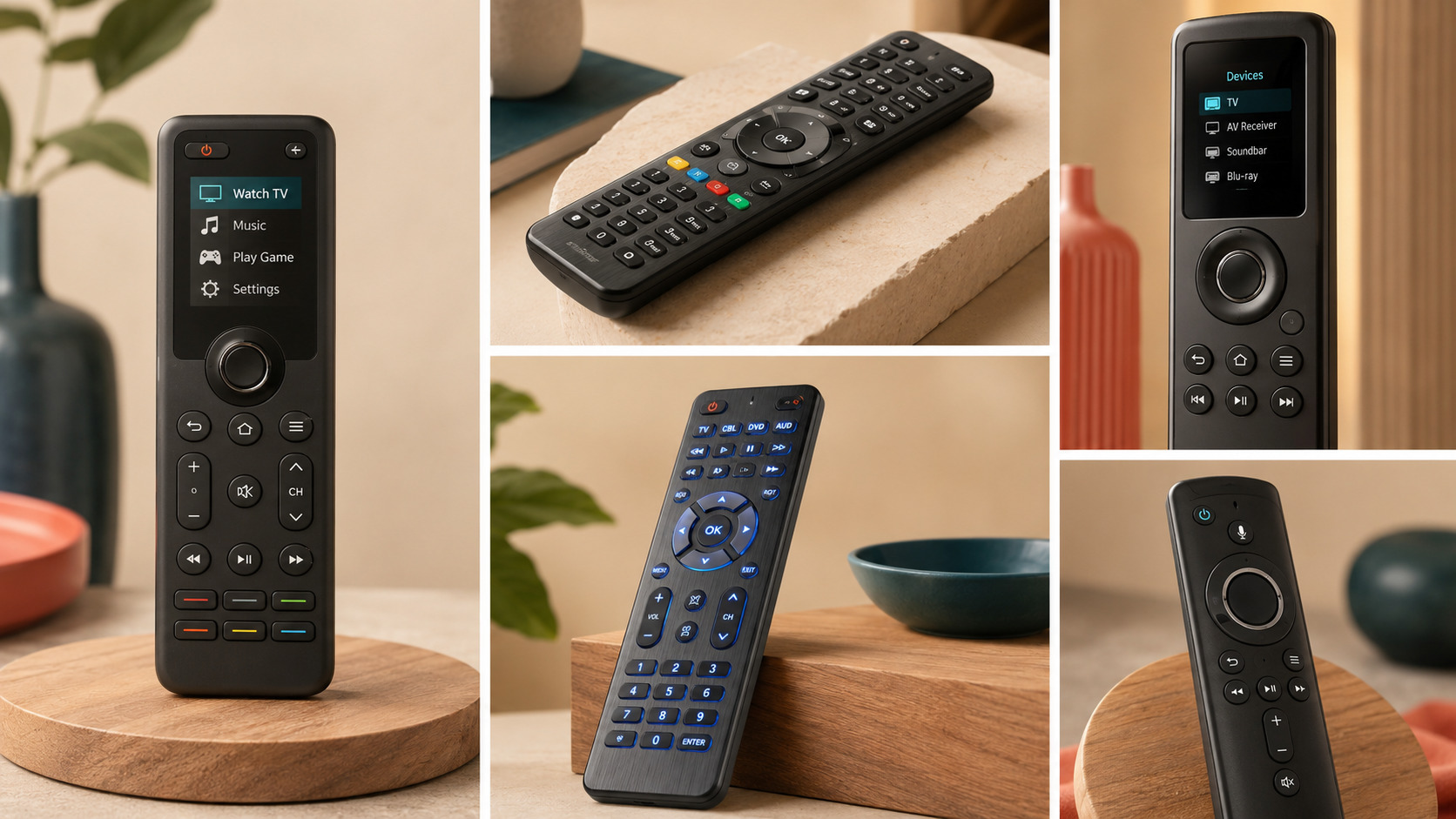
Lining up your remotes on the table is a quick way to see what you actually use—and which one universal remote could replace them.

Best universal remotes in 2026
Sofabaton U2
Best Overall
What it solves
You want one best universal remote that can handle a full living room setup—TV, soundbar or receiver, streaming boxes and consoles—without looking like a 90‑button spaceship.
Why it stands out
Sofabaton U2 is built for “real” multi‑device homes: it supports up to 15 devices and uses a small OLED screen plus a scroll wheel so you can swap between devices without cryptic mode buttons.
Once you’ve done the initial app‑based setup, you can program macros that power on multiple devices, select inputs and adjust settings with a single button press—perfect for a “movie night” or “game console” activity.
Reviewers and testers love that it feels high‑end without requiring hardcore expertise, though you do need to be comfortable using a companion app during setup.
- Controls up to 15 devices, enough for most home theaters.
- OLED screen and scroll wheel make device switching clear and simple.
- Programmable buttons and macros let you run “activities” with one press.
- Feels premium without needing a separate hub or base station.
- Requires a mobile app for setup and deeper customisation.
- Setup takes longer than basic code‑only remotes.
- No fully backlit keypad—only the display lights up.
GE 4‑Device 48844
Best Budget
What it solves
You just want an inexpensive remote that can replace that small pile of TV, cable box and basic soundbar remotes without needing an app or complex macros.
Why it stands out
GE’s 4‑Device 48844 is a classic universal clicker: it’s familiar in the hand, has clearly labelled input buttons and is easy to program via a printed code list.
It can control up to four devices—enough for a TV, soundbar, streaming box and maybe a Blu‑ray player—and full backlighting makes it far easier to use in darker rooms.
It doesn’t support advanced macros or apps, but that’s the point: it’s cheap, dependable and simple enough to hand to any houseguest without a tutorial.
- Very affordable yet reliable for everyday use.
- Backlit buttons make nighttime use much easier.
- Simple, clearly labelled layout with familiar controls.
- Quick setup using included code library.
- Only supports four devices—no headroom for larger setups.
- No programmable macros or advanced customisation.
- Small buttons can feel cramped for larger hands.
Philips SRP2024A/27
Best for Roku & Fire TV
What it solves
You rely on a Roku or Fire TV stick but still want one main remote to control your TV, soundbar and other IR gear—without giving up the original streaming remote.
Why it stands out
The Philips SRP2024A/27 is clever: it acts as a conventional universal remote for up to four IR devices, but has a built‑in Flip & Slide cradle on the back to hold a compatible Roku or Fire TV remote.
This solves the usual RF problem where universal remotes can’t directly replace streaming stick remotes. Instead, you keep both accessible in one chunky but practical package.
Setup is straightforward via codes, and dedicated device buttons make switching between TV, audio and streaming gear quick—even if the overall design is a bit bulkier and the button layout slightly unusual.
- Works with both IR devices and attached Roku/Fire TV remotes.
- Simple programming and reliable device switching.
- Built‑in cradle keeps the streaming remote close and hard to lose.
- Great for streaming‑centric living rooms.
- Chunkier than standard remotes due to the cradle.
- Button layout is less intuitive than simple clickers.
- Not all Roku or Fire TV remotes will fit—compatibility varies.
Sofabaton X1S
Best Premium
What it solves
You’re running a serious home theater or complex smart home and want a single, premium remote and hub that can orchestrate dozens of devices and highly customised activities.
Why it stands out
Sofabaton X1S is essentially the “enthusiast” upgrade to the U2, with support for up to 60 devices, a rechargeable battery and a hub‑based design that can integrate with voice assistants like Alexa and Google Assistant.
Through the app, you can create extremely detailed macros and activities that control multiple devices, switch inputs and adjust settings with tightly controlled timing.
It is overkill for simple living rooms, and setup is more complex, but if you genuinely have a rack of gear or multiple zones to manage, it’s one of the best universal remote options currently available.
- Handles up to 60 devices—ideal for complex setups.
- Powerful macro and activity support via the companion app.
- Rechargeable battery and hub‑based design feel premium.
- Supports smart voice control with popular assistants.
- Expensive compared with simpler remotes.
- Setup and daily navigation can feel complex for casual users.
- Scroll‑ball navigation and button placement take getting used to.
Acoyer Universal Remote
Best Simple 3‑Device
What it solves
You have a very simple setup—maybe just a TV, streaming box and soundbar—and want a dead‑simple remote that anyone in the house can use without questions.
Why it stands out
The Acoyer Universal Remote keeps everything basic: three clearly labelled device buttons across the top (like TV, STREAM and AUDIO), straightforward code‑based setup and no macro features to worry about.
That limited feature set is the whole point; even non‑techy family members can figure it out quickly, and it’s inexpensive enough to keep as a backup or secondary remote.
Build quality and compatibility are more modest than premium models, but for simple three‑device control it gets the job done.
- Very easy to understand and use, even for guests.
- Fast, straightforward setup via code library.
- Lightweight and comfortable in the hand.
- Great as a backup or secondary remote in another room.
- Only supports three devices—no room for expansion.
- No backlighting or advanced features like macros.
- Some brand compatibility gaps compared with bigger names.
Compare the best universal remotes
| Product name | Price range | Rating | Best for | CTA |
|---|---|---|---|---|
| Sofabaton U2 | ~$80 | ⭐ 4.5/5 | Best overall universal remote for 10–15 device setups | View on Amazon |
| GE 4‑Device 48844 | Under $20 | ⭐ 4.4/5 | Best budget remote for simple living rooms | View on Amazon |
| Philips SRP2024A/27 | ~$20 | ⭐ 4.2/5 | Best for Roku and Fire TV‑centric setups | View on Amazon |
| Sofabaton X1S | ~$230 | ⭐ 4.3/5 | Best premium hub for complex home theaters | View on Amazon |
| Acoyer Universal Remote | Under $15 | ⭐ 4.1/5 | Best simple three‑device remote | View on Amazon |
Sofabaton U2 vs Sofabaton X1S
Our two strongest options both come from Sofabaton: the U2 and the X1S. They share the same DNA but are built for different types of users.
Choose Sofabaton U2 if…
- You want the best universal remote for a typical but busy living room (TV, soundbar, streaming box, consoles).
- You like the idea of macros but don’t need more than 10–15 devices.
- You prefer a single handheld remote without extra hubs on your TV stand.
For most households, U2 hits the sweet spot of power, price and everyday simplicity.
Choose Sofabaton X1S if…
- You run a serious home theater or multiple zones with lots of gear.
- You want to integrate voice control and complex scenes across 20+ devices.
- You’re comfortable spending time in the app to program detailed activities.
It’s the better choice when you truly need hub‑level control, but it’s overkill for most living rooms.
If you’re debating between them, ask whether you’ll genuinely exceed 10–15 devices or use advanced smart home scenes. If not, stick with the U2 and put the extra budget toward a better soundbar or streaming box.
Common universal remote mistakes to avoid
- Assuming “universal” means guaranteed compatibility with every Roku, Fire TV or niche device—always check the manufacturer’s compatibility list.
- Buying an ultra‑premium remote when your setup and patience are strictly “basic.”
- Skipping proper labelling of activities or device modes, which makes the remote confusing for everyone else.
- Not keeping the original remotes somewhere safe in case you need to re‑program codes or troubleshoot.
- Ignoring battery type and charge habits—rechargeable models are great until they’re flat on movie night.
A few minutes spent checking compatibility and planning activities will save you far more time than endlessly explaining “no, press this button first” to family and guests.
The right universal remote fades into the background—you just press one button and everything works the way you expect.
What actually matters in a universal remote
Specs and buzzwords aside, a handful of things really determine whether a universal remote feels like an upgrade or another headache.
- Ease of setup. A best universal remote should be easy to get running on your main devices, whether via codes or a well‑designed app.
- Daily clarity. Clear indication of which device you’re controlling and what each button does matters more than obscure extra functions.
- Device capacity. Make sure the maximum number of devices (3, 4, 15 or 60) matches your current and future plans.
- Macro support. If you hate multi‑step sequences, prioritise remotes that support activities or macros and make them easy to create.
- Comfort & layout. A comfortable shape and sensible button layout are what you feel every single day.
- Compatibility & support. Good manufacturer databases and clear compatibility notes save you from nasty surprises with your gear.
Our top recommendation
Sofabaton U2 – the best universal remote for most people
If you want to go from “pile of remotes” to “one remote that handles everything,” Sofabaton U2 is the easiest overall recommendation. It’s flexible enough to run complex setups, yet still intuitive enough that you don’t need to be an AV installer to live with it.
The combination of 15‑device support, an OLED screen, scroll wheel and powerful macros means you can design simple, family‑friendly routines like “Watch Netflix” or “Play Xbox” that actually work.
It does require a bit of initial effort in the app, but once your activities are set, day‑to‑day use is straightforward. For most homes, it strikes the best balance of price, capability and long‑term comfort.
Popular pick – often among the top‑rated universal remotes online. Prices subject to change.
The real win is not the remote itself—it’s the feeling of pressing one button and getting straight to what you wanted to do.

Universal remote FAQ
Not always. Most best universal remote models support a wide range of TV and audio brands, but there can be gaps—especially with very new, very old or niche devices. Always check the compatibility list or app database before you buy.
Many universal remotes send infrared signals, while Roku and Fire TV sticks often rely on RF or Bluetooth. That’s why models like Philips SRP2024A/27 use a built‑in cradle to hold the original streaming remote instead of replacing it outright.
Basic remotes with code libraries can be ready in 10–20 minutes. More advanced options like Sofabaton U2 or X1S may take an hour or so to dial in devices and activities, but you only do this once and it pays off every movie night.
It’s smart to keep original remotes in a drawer. You may need them for initial pairing, accessing rarely used settings, or re‑programming your universal remote after upgrades.
They don’t have to be. If you choose a model with clear device labels or well‑named activities, you can usually make things simpler than your original pile of remotes—especially with one‑button scenes like “Watch TV.”
Found this universal remote guide helpful? Save it so you can come back when you’re finally ready to retire that pile of remotes.
Follow @theclutteredblog on Pinterest for more clutter‑free tech, home and product picks that actually make everyday life smoother.